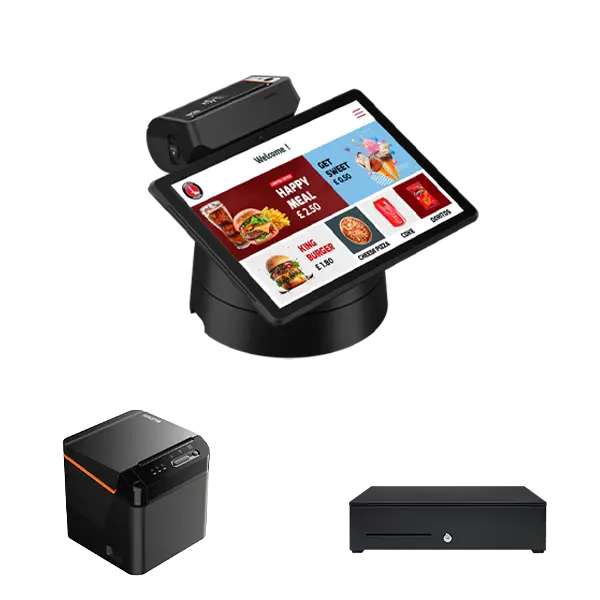
Walk into almost any shop, café or salon in the UK and the till is probably doing a lot more than taking money. Owners often ask what is EPOS system software and whether it justifies the outlay. So, what is EPOS? It stands for electronic point of sale: the hardware and software that records each sale, takes the payment and updates your stock and sales figures in real time. For an EPOS system for small business owners, that can mean the end of tedious cash-ups, handwritten stock sheets and guesswork. This guide explains how it works, the most important EPOS benefits, the everyday advantage of EPOS over a traditional cash register, and what is the best EPOS system to look for in your own business.

What Is an EPOS System and How Does It Work?
In short, what is EPOS? It is a till that is connected to the rest of your business. A traditional cash register simply records a total and opens a drawer. An EPOS terminal records exactly what was sold, when, for how much and by whom, then feeds that information into software you can check from anywhere.
Most setups include a touchscreen or tablet, a receipt printer, a cash drawer, a barcode scanner (for retail) and a card reader. Pair it with reliable card machines and the payment goes straight through, with the sale logged automatically. Behind the screen, the software handles the clever bits: deducting items from stock, applying discounts and VAT, and building reports as you trade.
The Main Benefits of Using an EPOS System
The advantage of EPOS over a basic till is that every sale becomes usable information. The practical gains tend to show up in five areas.
Faster, more accurate checkouts
Staff tap items or scan barcodes instead of typing prices, which cuts keying errors and shortens queues. Saved menus, modifiers and discounts also mean fewer pricing questions at busy times.
Stock control you can trust
Every sale deducts stock automatically, so you can see what is running low before a shelf or storeroom empties. Many systems send low-stock alerts or generate purchase orders, helping you avoid both dead stock and lost sales.
Reports that show what actually sells
Sales by product, hour, day or team member reveal your best sellers, your quiet periods and your real margins. That makes rotas, ordering and pricing far easier than relying on gut feel.
Simpler accounts and VAT
Digital sales records can flow straight into your accounting software, saving manual entry at month end. GOV.UK’s guidance on charging, reclaiming and recording VAT sets out the records you need to keep, and an EPOS system makes keeping them far less of a chore.
A smoother customer experience
Split bills, loyalty schemes, e-receipts and quicker service all add up. Customers rarely notice good EPOS, but they certainly notice a slow queue or a wrong total.
Is EPOS Worth It for a Small Business?
Smaller operators sometimes assume EPOS is only for chains. In practice, independent cafés, boutiques, barbers and market traders often feel the difference most, because they have fewer staff and less time for admin. If you already take card payments, adding EPOS is a natural next step, and it is worth considering alongside your merchant services for small businesses so that payments and sales data sit together rather than in separate places.
It does come with trade-offs. You will pay for hardware, software subscriptions and processing fees, and staff need a little training. If you sell a handful of items a week, a simple card reader may be enough. If you manage stock, staff or several sales channels, EPOS is usually worth the investment.
How to Choose the Best EPOS System
There is no single winner, because the right choice depends on what you sell and how you trade. These checks will narrow the field quickly.
Start with your business type
A restaurant needs table plans, kitchen printing and modifiers. A shop needs barcode scanning, product variants and stock counts. A salon needs bookings and staff commission. Choose software built for your sector rather than forcing a generic tool to fit, and browse EPOS systems designed for different trades to see how setups differ.
Look at hardware and payments
Check whether the hardware is included, leased or bought outright, and whether it works with your existing card machines or ties you to one payment provider. Ask about processing rates, not just the monthly fee.
Check integrations and reporting
Look for links to your accounting package, online shop, delivery platforms and loyalty tools. Test the reports in a demo: if you cannot find daily takings and top sellers in a couple of clicks, move on.
Weigh support, contract and security
Find out what happens if the system fails on a Saturday afternoon. Is there UK-based support, and does it keep working offline? Read the contract length and exit terms carefully, and make sure your provider supports the card data security standards set by the PCI Security Standards Council. Finally, ask for a demo or trial and let the staff who will use it every day have a go.
Conclusion
An EPOS system is far more than a modern till. It speeds up service, keeps stock honest, simplifies your VAT records and shows you which parts of your business are really working. So, what is EPOS good for? Making decisions from real numbers instead of hunches. Weigh the EPOS benefits against the cost and most shops, cafés and salons with a steady flow of customers will find it worthwhile. Start by listing what you sell, how you take payments and which tools you already use, then compare two or three providers against that list. If you would like help choosing a setup, Contact Us and our team will talk you through the options.
Frequently Asked Questions
What is EPOS system software, and how is it different from a till?
EPOS system software runs on your terminal or tablet to process sales, manage stock and produce reports. A traditional till only records a total and holds cash, whereas EPOS records what was sold and shares that data with the rest of your business tools.
What does EPOS stand for?
EPOS stands for electronic point of sale. It describes the technology used at the moment a customer pays for goods or services.
What are the disadvantages of an EPOS system?
The main drawbacks are upfront hardware costs, ongoing subscription fees and a short learning curve for staff. Cloud-based systems also rely on an internet connection, so check how the system behaves if it drops.
How much does an EPOS system cost?
It varies widely depending on the hardware, features and number of terminals. Expect to pay for hardware (bought or leased), a software subscription and payment processing. Ask for quotes that cover all three so you can compare like for like.
Can an EPOS system work without the internet?
Many can. Offline mode records sales locally and syncs them when the connection returns, although card payments and some features may be limited. Confirm exactly what works offline before you sign a contract.